In 2026, the definition of a designer has expanded significantly. Creating professional-grade visuals no longer requires years of schooling or mastery of complex software suites. For beginners, small business owners, and content creators, the priority has shifted from learning technical skills to finding the right creative partner. Among the myriad of options available, Banana Pro AI has emerged as a standout choice for those seeking to bridge the gap between a mental concept and a finished visual asset. This article provides an in-depth look at why this specific tool is leading the charge for novices this year, examining its features, usability, and practical applications in detail.
I. The Changing Nature of Design in 2026
The way people approach visual creation has undergone a fundamental transformation. The heavy lifting is now handled by algorithms, allowing human creativity to focus on direction and intent rather than manual execution. Several key factors define this new environment for beginners.
- Accessibility Over Technicality
In the past, high-end design was gated behind steep learning curves. Understanding vector paths, layers, and masking was mandatory. Now, tools prioritize natural language processing. A user describes what they need in plain English, and the software interprets that request. This shift democratizes design, ensuring that a great idea is not held back by a lack of technical training.
- Speed and Iteration
Traditional workflows often meant that a single concept art piece could take days to finalize. In 2026, efficiency is paramount. Users can now generate dozens of variations in minutes. This speed allows for rapid testing of different aesthetics, colors, and compositions, enabling a “fail fast, succeed sooner” approach that was previously impossible for solo creators.
- Cost-Effective Professionalism
Hiring a professional illustrator or photographer is expensive, often prohibitively so for startups or hobbyists. Modern AI tools provide a budget-friendly alternative without sacrificing quality. High-resolution, commercially viable images are now attainable for the price of a monthly subscription, leveling the playing field for smaller players competing with established brands.
II. Why Banana Pro AI is the Top Choice for Beginners
While many tools claim to be user-friendly, Banana Pro AI delivers on that promise through a thoughtful balance of simplicity and power. It removes the friction often associated with generative tech, offering a smooth experience from login to download.
- A Clean, Distraction-Free Interface
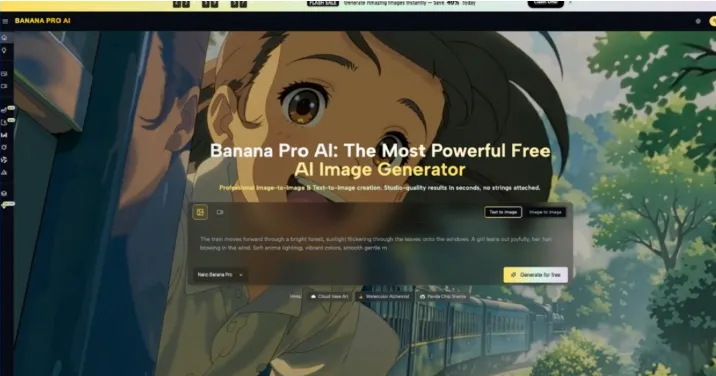
First impressions matter. Upon entering Banana Pro AI, users are greeted with a minimalist layout. There are no cluttered toolbars or confusing menus. The design focuses entirely on the input field and the output gallery. This clarity reduces cognitive load, allowing the user to concentrate solely on their creative prompt without getting lost in settings.
- High-Performance Generation Engine
Under the hood, Banana Pro AI utilizes advanced models capable of understanding complex instructions. Whether the request involves intricate lighting, specific textures, or dynamic poses, the engine renders these details with remarkable accuracy. This reliability means users spend less time fighting with the tool and more time selecting the perfect image.
- Optimized for Various Use Cases
One size rarely fits all in design. Banana Pro AI understands this and offers flexibility. It handles everything from photorealistic portraits for LinkedIn profiles to stylized illustrations for blog headers. The tool adapts its rendering technique based on the context provided in the prompt, ensuring the output matches the intended application.
- Browser-Based Convenience
There is no need for expensive hardware or heavy software installations. Banana Pro AI operates entirely in the cloud. This means a user can generate 4K images on a modest laptop or even a tablet. This portability ensures that creativity can happen anywhere, whether at a coffee shop or a home office.
III. Mastering Visuals with Banana Pro AI Image Generator
The heart of this ecosystem is the Banana Pro AI Image Generator. This feature set is where the magic happens, turning text into pixels with impressive fidelity. It offers several specific advantages that make it particularly suited for those new to AI art.
- Precise Prompt Adherence
A common frustration with early AI models was their tendency to ignore specific parts of a prompt. The Banana Pro AI Image Generator excels in “instruction following.” If a user specifies a “blue tie on a red shirt,” the tool respects those color constraints rigorously. This precision is vital for brand consistency, where specific colors or elements must be present.
- Diverse Style Presets
Beginners often struggle to describe the exact art style they want. The Banana Pro AI Image Generator assists with this by offering intuitive guidance or understanding broad style descriptors.
- Photorealism: Creates images indistinguishable from photographs, perfect for product mockups.
- 3D Render: Mimics the look of high-end CGI, ideal for game assets or futuristic concepts.
- Oil Painting/Watercolor: Simulates traditional media for a more artistic, handcrafted feel.
- Vector Art: Produces clean, flat illustrations suitable for logos and icons.
- Aspect Ratio Control
Different channels require different dimensions. An Instagram Story needs a 9:16 vertical ratio, while a YouTube thumbnail requires 16:9. Banana Pro AI Image Generator allows users to define these ratios before generation. This built-in formatting saves time by eliminating the need to crop or resize images in external software later.

IV. A Step-by-Step Workflow for Your First Masterpiece
For those ready to dive in, the process is straightforward. Follow this guide to maximize the potential of Banana Pro AI.
- Conceptualization and Keyword Selection
Before typing, take a moment to deconstruct the image in your mind. Identify the subject, the action, the setting, and the mood. Select 3-5 strong keywords. For example, instead of just “a cat,” think “fluffy Siamese cat, sleeping on a windowsill, sunny afternoon, soft lighting.”
- Drafting the Prompt
Enter your description into Banana Pro AI. Structure the sentence logically. Start with the main subject, follow with the environment, and end with style modifiers.
- Draft: “A futuristic city street at night, neon lights, rain on pavement, cyberpunk style, highly detailed, 8k resolution.”
- Configuring Parameters
Choose the aspect ratio that fits your destination. If you are making a wallpaper, select a wide format. If it is for a mobile background, choose vertical. Double-check that you haven’t included any conflicting instructions in your prompt.
- Generation and Review
Hit the generate button. In moments, the Banana Pro AI Image Generator will present you with options. Review them critically. Look for lighting consistency and detail clarity. If the result isn’t perfect, do not be discouraged.
- Iteration and Refinement
Use the first batch of images as feedback. If the image is too dark, add “bright lighting” to your prompt. If the style is too cartoonish, add “photorealistic” or “unreal engine 5 render.” Small tweaks often lead to significantly better results.
- Final Selection and Upscaling
Once satisfied, select the best version. Banana Pro AI ensures high-resolution downloads, making the file ready for print or web use immediately. Save your successful prompts for future reference to maintain a consistent style across projects.
V. Practical Applications: How to Use It Today
Understanding the features is one thing; applying them to real-world scenarios is where the value lies. Here is how Banana Pro AI serves as a versatile asset across different industries and hobbies.
- Content Marketing and Blogging
Stock photos can feel generic and repetitive. With Banana Pro AI, writers can create bespoke imagery that perfectly matches their article’s theme. A blog post about “cybersecurity in 2026” can feature a custom illustration of a digital lock, colored to match the website’s branding, rather than a standard, overused stock image.
- Social Media Management
The demand for fresh content on social channels is relentless. Banana Pro AI acts as an on-demand graphic designer. A social media manager can generate a week’s worth of cohesive visuals—promotional posts, inspirational quotes backgrounds, and engagement starters—in a single afternoon, keeping the feed active and visually appealing.
- E-Commerce and Product Mockups
For online sellers, presentation is key. Small businesses can use Banana Pro AI to place their products in lifestyle settings without organizing a physical photoshoot. A seller of handmade candles can generate an image of a “cozy living room with a fireplace” to serve as a backdrop, helping customers visualize the product in their own homes.
- Concept Art and Storyboarding
Filmmakers, game developers, and authors can use the tool to visualize scenes and characters. It serves as a rapid prototyping tool. Before committing to a final design or hiring an artist, a creator can generate storyboards to establish the mood, lighting, and composition of a scene, ensuring the entire team shares the same vision.
VI. Conclusion
The landscape of design has changed, but the need for compelling visuals remains constant. Banana Pro AI offers a powerful, accessible solution for anyone looking to create high-quality images without the steep learning curve of traditional software. By combining an intuitive interface with a robust generation engine, it empowers beginners to compete on a professional level. Whether for business, storytelling, or personal expression, the ability to turn text into art is now at your fingertips. In 2026, the only limit is your imagination.
